# LightRAG - 轻量级快速检索增强生成系统
一款结合知识图谱与向量检索的高性能RAG框架,支持多模态文档处理与多模型灵活接入,可快速搭建生产级私有智能知识库问答系统。
## (一)项目简介
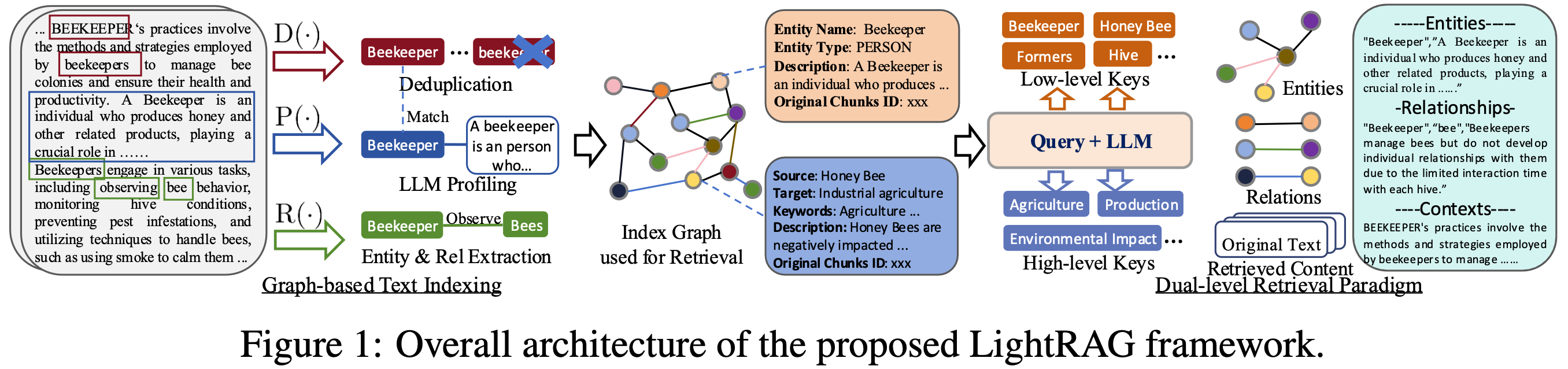
本项目核心定位是解决传统RAG系统检索精度不足、上下文理解能力弱、部署配置复杂的行业痛点,通过创新的知识图谱增强检索架构,在保持轻量高效的同时大幅提升问答的全面性、多样性与准确性。支持文本、图片、表格、公式等多模态内容处理,兼容OpenAI、Hugging Face、Ollama等主流大模型生态,以及PostgreSQL、Neo4J、Faiss等10余种存储后端,提供开箱即用的Web UI、RESTful API与Python SDK,显著降低RAG系统的开发与运维成本。
核心优势包括:性能优于传统RAG及GraphRAG等主流方案,在法律、农业、计算机等多个领域评测中表现突出;内置自动化知识图谱构建、编辑与可视化能力;支持本地/全局/混合等6种检索模式,适配不同查询场景;完整的多模态处理能力(集成RAG-Anything);灵活的插件化架构,支持自定义模型与存储扩展;提供Docker与K8s部署方案,可直接用于生产环境。
## (二)环境前置要求
- **操作系统**:支持Windows、Linux、macOS全平台
- **Python版本**:Python 3.9+(推荐3.10+)
- **Docker部署**:需提前安装Docker 20.10+及Docker Compose v2+
- **硬件要求**:最低2核4G内存,推荐4核8G以上;使用本地大模型需8G以上显存GPU
- **可选依赖**:Git版本管理工具、CUDA 11.8+(GPU加速)、textract(多格式文档解析)
## (三)快速开始 / 安装部署
### 1. PyPI 安装(推荐)
#### 服务器版(含Web UI与API)
```bash
pip install "lightrag-hku[api]"
```
#### 核心版(仅Python SDK)
```bash
pip install lightrag-hku
```
### 2. 源码安装
```bash
git clone https://github.com/HKUDS/LightRAG.git
cd LightRAG
# 创建并激活虚拟环境(可选)
python -m venv venv
source venv/bin/activate # Windows: venv\Scripts\activate
# 安装带API支持的开发版本
pip install -e ".[api]"
```
### 3. Docker Compose 部署(生产环境推荐)
```bash
git clone https://github.com/HKUDS/LightRAG.git
cd LightRAG
cp env.example .env
# 编辑.env文件,配置LLM API密钥与模型参数
docker compose up -d
```
## (四)基础使用示例
### 1. 核心库快速入门(OpenAI模型)
```python
import os
import asyncio
from lightrag import LightRAG, QueryParam
from lightrag.llm.openai import gpt_4o_mini_complete, openai_embed
from lightrag.kg.shared_storage import initialize_pipeline_status
# 设置工作目录与API密钥
WORKING_DIR = "./rag_storage"
os.environ["OPENAI_API_KEY"] = "你的OpenAI API密钥"
if not os.path.exists(WORKING_DIR):
os.mkdir(WORKING_DIR)
async def main():
# 初始化LightRAG实例
rag = LightRAG(
working_dir=WORKING_DIR,
embedding_func=openai_embed,
llm_model_func=gpt_4o_mini_complete,
)
# 必须执行的初始化步骤
await rag.initialize_storages()
await initialize_pipeline_status()
# 插入文档内容
rag.insert("LightRAG是香港大学数据科学实验室开发的轻量级快速检索增强生成系统,结合了知识图谱与向量检索技术。")
# 执行混合检索问答
result = await rag.query(
"LightRAG是什么?它有什么技术特点?",
param=QueryParam(mode="hybrid", response_type="Bullet Points")
)
print(result)
await rag.finalize_storages()
if __name__ == "__main__":
asyncio.run(main())
```
### 2. Web UI 使用
1. 部署完成后访问 `http://localhost:8000` 进入管理界面
2. 在「文档管理」页面上传PDF、DOCX、PPTX、CSV等格式文档
3. 等待系统自动完成文档解析、实体提取与知识图谱构建
4. 在「问答」页面输入问题,支持流式响应与多轮对话
5. 在「知识图谱」页面可视化查看实体关系与检索路径
### 3. 多模态文档处理
```bash
# 安装多模态依赖
pip install raganything
```
```python
import asyncio
from raganything import RAGAnything
from lightrag.llm.openai import openai_complete_if_cache, openai_embed
async def main():
rag = RAGAnything(
working_dir="./multimodal_rag",
llm_model_func=lambda prompt, **kwargs: openai_complete_if_cache(
"gpt-4o-mini", prompt, api_key="你的API密钥", **kwargs
),
embedding_func=lambda texts: openai_embed(
texts, model="text-embedding-3-large", api_key="你的API密钥"
),
embedding_dim=3072,
)
# 处理包含图片、表格、公式的PDF文档
await rag.process_document_complete("path/to/your/document.pdf")
# 查询多模态内容
result = await rag.query_with_multimodal(
"请总结文档中表格展示的实验数据",
mode="hybrid"
)
print(result)
if __name__ == "__main__":
asyncio.run(main())
```
## (五)开源许可证
本项目开源许可证详情请参考项目根目录下的 `LICENSE` 文件。
## 补充信息
- 学术引用:
```bibtex
@article{guo2024lightrag,
title={LightRAG: Simple and Fast Retrieval-Augmented Generation},
author={Zirui Guo and Lianghao Xia and Yanhua Yu and Tu Ao and Chao Huang},
year={2024},
eprint={2410.05779},
archivePrefix={arXiv},
primaryClass={cs.IR}
}
```
- 支持的存储后端:
- KV存储:JSON、PostgreSQL、Redis、MongoDB
- 向量存储:NanoVector、PGVector、Milvus、Chroma、Faiss、Qdrant
- 图存储:NetworkX、Neo4J、PostgreSQL+AGE
- 支持的大模型:OpenAI系列、Hugging Face开源模型、Ollama本地模型、LlamaIndex兼容模型
- 核心功能:引用溯源、Token使用统计、数据导出、缓存管理、自定义知识图谱、批量文档处理
- 交流社区:项目Discord频道(链接见官方README)
# 🚀 LightRAG: Simple and Fast Retrieval-Augmented Generation
---
---
## 🎉 News
- [2026.05]🎯[New Feature]: **Merge RagAnything into LightRAG**🎉. Multimodal content parsing and extraction via **MinerU / Docling** services.
- [2026.05]🎯[New Feature]: Introducing four selectable text chunking strategies: `Fix`, `Recursive`, `Vector`, and `Paragraph`.
- [2026.05]🎯[New Feature]: **Role-specific LLM configuration** support, 4 distinct roles: EXTRACT, QUERY, KEYWORDS, and VLM, with independent LLM settings.
- [2026.03]🎯[New Feature]: Integrated **OpenSearch** as a unified storage backend, providing comprehensive support for all four LightRAG storage.
- [2026.03]🎯[New Feature]: Introduced a setup wizard. Support for local deployment of embedding, reranking, and storage backends via Docker.
- [2025.11]🎯[New Feature]: Integrated **RAGAS for Evaluation** and **Langfuse for Tracing**. Updated the API to return retrieved contexts alongside query results to support context precision metrics.
- [2025.10]🎯[Scalability Enhancement]: Eliminated processing bottlenecks to support **Large-Scale Datasets Efficiently**.
- [2025.09]🎯[New Feature] Enhances knowledge graph extraction accuracy for **Open-Sourced LLMs** such as Qwen3-30B-A3B.
- [2025.08]🎯[New Feature] **Reranker** is now supported, significantly boosting performance for mixed queries (set as default query mode).
- [2025.08]🎯[New Feature] Added **Document Deletion** with automatic KG regeneration to ensure optimal query performance.
- [2025.06]🎯[New Release] Our team has released [RAG-Anything](https://github.com/HKUDS/RAG-Anything) — an **All-in-One Multimodal RAG** system for seamless processing of text, images, tables, and equations.
- [2025.06]🎯[New Feature] LightRAG now supports comprehensive multimodal data handling through [RAG-Anything](https://github.com/HKUDS/RAG-Anything) integration, enabling seamless document parsing and RAG capabilities across diverse formats including PDFs, images, Office documents, tables, and formulas. Please refer to the new [multimodal section](https://github.com/HKUDS/LightRAG/?tab=readme-ov-file#multimodal-document-processing-rag-anything-integration) for details.
- [2025.03]🎯[New Feature] LightRAG now supports citation functionality, enabling proper source attribution and enhanced document traceability.
- [2025.02]🎯[New Feature] You can now use MongoDB as an all-in-one storage solution for unified data management.
- [2025.02]🎯[New Release] Our team has released [VideoRAG](https://github.com/HKUDS/VideoRAG)-a RAG system for understanding extremely long-context videos
- [2025.01]🎯[New Release] Our team has released [MiniRAG](https://github.com/HKUDS/MiniRAG) making RAG simpler with small models.
- [2025.01]🎯You can now use PostgreSQL as an all-in-one storage solution for data management.
- [2024.11]🎯[New Resource] A comprehensive guide to LightRAG is now available on [LearnOpenCV](https://learnopencv.com/lightrag). — explore in-depth tutorials and best practices. Many thanks to the blog author for this excellent contribution!
- [2024.11]🎯[New Feature] Introducing the LightRAG WebUI — an interface that allows you to insert, query, and visualize LightRAG knowledge through an intuitive web-based dashboard.
- [2024.11]🎯[New Feature] You can now [use Neo4J for Storage](https://github.com/HKUDS/LightRAG?tab=readme-ov-file#using-neo4j-for-storage)-enabling graph database support.
- [2024.10]🎯[New Feature] We've added a link to a [LightRAG Introduction Video](https://youtu.be/oageL-1I0GE). — a walkthrough of LightRAG's capabilities. Thanks to the author for this excellent contribution!
- [2024.10]🎯[New Channel] We have created a [Discord channel](https://discord.gg/yF2MmDJyGJ)!💬 Welcome to join our community for sharing, discussions, and collaboration! 🎉🎉
Algorithm Flowchart
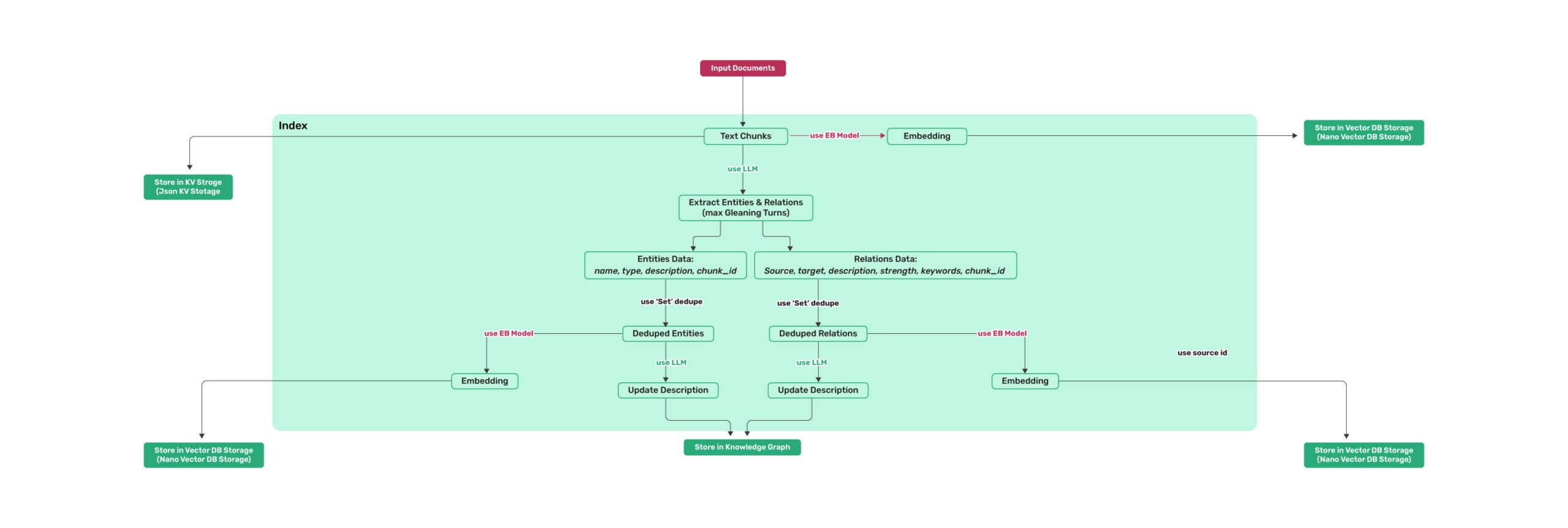
*Figure 1: LightRAG Indexing Flowchart - Img Caption : [Source](https://learnopencv.com/lightrag/)*
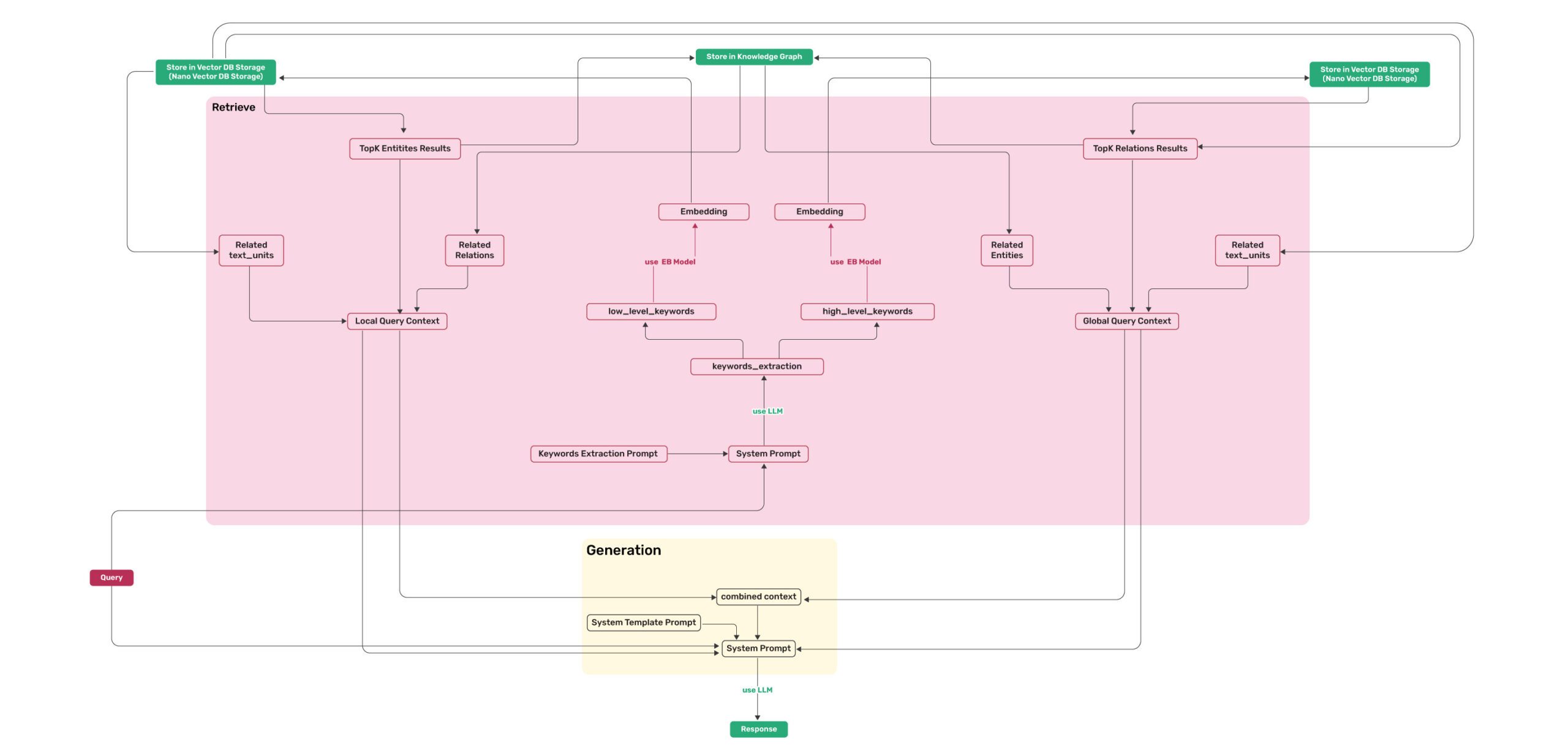
*Figure 2: LightRAG Retrieval and Querying Flowchart - Img Caption : [Source](https://learnopencv.com/lightrag/)*
## Installation
**💡 Using uv for Package Management**: This project uses [uv](https://docs.astral.sh/uv/) for fast and reliable Python package management. Install uv first: `curl -LsSf https://astral.sh/uv/install.sh | sh` (Unix/macOS) or `powershell -c "irm https://astral.sh/uv/install.ps1 | iex"` (Windows)
> **Note**: You can also use pip if you prefer, but uv is recommended for better performance and more reliable dependency management.
>
> **📦 Offline Deployment**: For offline or air-gapped environments, see the [Offline Deployment Guide](./docs/OfflineDeployment.md) for instructions on pre-installing all dependencies and cache files.
### Install LightRAG Server
The LightRAG Server is designed to provide Web UI and API support. The Web UI facilitates document indexing, knowledge graph exploration, and a simple RAG query interface. LightRAG Server also provide an Ollama compatible interfaces, aiming to emulate LightRAG as an Ollama chat model. This allows AI chat bot, such as Open WebUI, to access LightRAG easily.
* Install from PyPI
```bash
### Install LightRAG Server as tool using uv (recommended)
uv tool install "lightrag-hku[api]"
### Or using pip
# python -m venv .venv
# source .venv/bin/activate # Windows: .venv\Scripts\activate
# pip install "lightrag-hku[api]"
### Build front-end artifacts
cd lightrag_webui
bun install --frozen-lockfile
bun run build
cd ..
# Setup env file
# Obtain the env.example file by downloading it from the GitHub repository root
# or by copying it from a local source checkout.
cp env.example .env # Update the .env with your LLM and embedding configurations
# Launch the server
lightrag-server
```
* Installation from Source
```bash
git clone https://github.com/HKUDS/LightRAG.git
cd LightRAG
# Bootstrap the development environment (recommended)
make dev
source .venv/bin/activate # Activate the virtual environment (Linux/macOS)
# Or on Windows: .venv\Scripts\activate
# make dev installs the test toolchain plus the full offline stack
# (API, storage backends, and provider integrations), then builds the frontend.
# Run make env-base or copy env.example to .env before starting the server.
# Equivalent manual steps with uv
# Note: uv sync automatically creates a virtual environment in .venv/
uv sync --extra test --extra offline
source .venv/bin/activate # Activate the virtual environment (Linux/macOS)
# Or on Windows: .venv\Scripts\activate
### Or using pip with virtual environment
# python -m venv .venv
# source .venv/bin/activate # Windows: .venv\Scripts\activate
# pip install -e ".[test,offline]"
# Build front-end artifacts
cd lightrag_webui
bun install --frozen-lockfile
bun run build
cd ..
# setup env file
make env-base # Or: cp env.example .env and update it manually
# Launch API-WebUI server
lightrag-server
```
* Launching the LightRAG Server with Docker Compose
```bash
git clone https://github.com/HKUDS/LightRAG.git
cd LightRAG
cp env.example .env # Update the .env with your LLM and embedding configurations
# modify LLM and Embedding settings in .env
docker compose up
```
> Historical versions of LightRAG docker images can be found here: [LightRAG Docker Images]( https://github.com/HKUDS/LightRAG/pkgs/container/lightrag)
>
> Official GHCR images published by GitHub Actions are signed with Sigstore Cosign using GitHub OIDC. See [docs/DockerDeployment.md](./docs/DockerDeployment.md#verify-official-ghcr-images-with-cosign) for verification commands.
### Create .env File With Setup Tool
Instead of editing `env.example` by hand, use the interactive setup wizard to generate a configured `.env` and, when needed, `docker-compose.final.yml`:
```bash
make env-base # Required first step: LLM, embedding, reranker
make env-storage # Optional: storage backends and database services
make env-server # Optional: server port, auth, and SSL
make env-base-rewrite # Optional: force-regenerate wizard-managed compose services
make env-storage-rewrite # Optional: force-regenerate wizard-managed compose services
make env-security-check # Optional: audit the current .env for security risks
```
For full description of every target see [docs/InteractiveSetup.md](./docs/InteractiveSetup.md).
The setup wizards update configuration only; run `make env-security-check` separately to audit the
current `.env` for security risks before deployment.
By default, rerunning the setup preserves unchanged wizard-managed compose service blocks; use a
`*-rewrite` target only when you need to rebuild those managed blocks from the bundled templates.
### Install LightRAG Core
* Install from source (Recommended)
```bash
cd LightRAG
# Note: uv sync automatically creates a virtual environment in .venv/
uv sync
source .venv/bin/activate # Activate the virtual environment (Linux/macOS)
# Or on Windows: .venv\Scripts\activate
# Or: pip install -e .
```
* Install from PyPI
```bash
uv pip install lightrag-hku
# Or: pip install lightrag-hku
```
## Quick Start
### LLM and Technology Stack Requirements for LightRAG
LightRAG's demands on the capabilities of Large Language Models (LLMs) are significantly higher than those of traditional RAG, as it requires the LLM to perform entity-relationship extraction tasks from documents. Configuring appropriate Embedding and Reranker models is also crucial for improving query performance.
- **LLM Selection**:
- It is recommended to use an LLM with at least 32 billion parameters.
- The context length should be at least 32KB, with 64KB being recommended.
- It is not recommended to choose reasoning models during the document indexing stage.
- During the query stage, it is recommended to choose models with stronger capabilities than those used in the indexing stage to achieve better query results.
- **Embedding Model**:
- A high-performance Embedding model is essential for RAG.
- We recommend using mainstream multilingual Embedding models, such as: `BAAI/bge-m3` and `text-embedding-3-large`.
- **Important Note**: The Embedding model must be determined before document indexing, and the same model must be used during the document query phase. For certain storage solutions (e.g., PostgreSQL), the vector dimension must be defined upon initial table creation. Therefore, when changing embedding models, it is necessary to delete the existing vector-related tables and allow LightRAG to recreate them with the new dimensions.
- **Reranker Model Configuration**:
- Configuring a Reranker model can significantly enhance LightRAG's retrieval performance.
- When a Reranker model is enabled, it is recommended to set the "mix mode" as the default query mode.
- We recommend using mainstream Reranker models, such as: `BAAI/bge-reranker-v2-m3` or models provided by services like Jina.
### Quick Start for LightRAG Server
The LightRAG Server is designed to provide Web UI and API support. The LightRAG Server offers a comprehensive knowledge graph visualization feature. It supports various gravity layouts, node queries, subgraph filtering, and more. For more information about LightRAG Server, please refer to [LightRAG Server](./docs/LightRAG-API-Server.md).
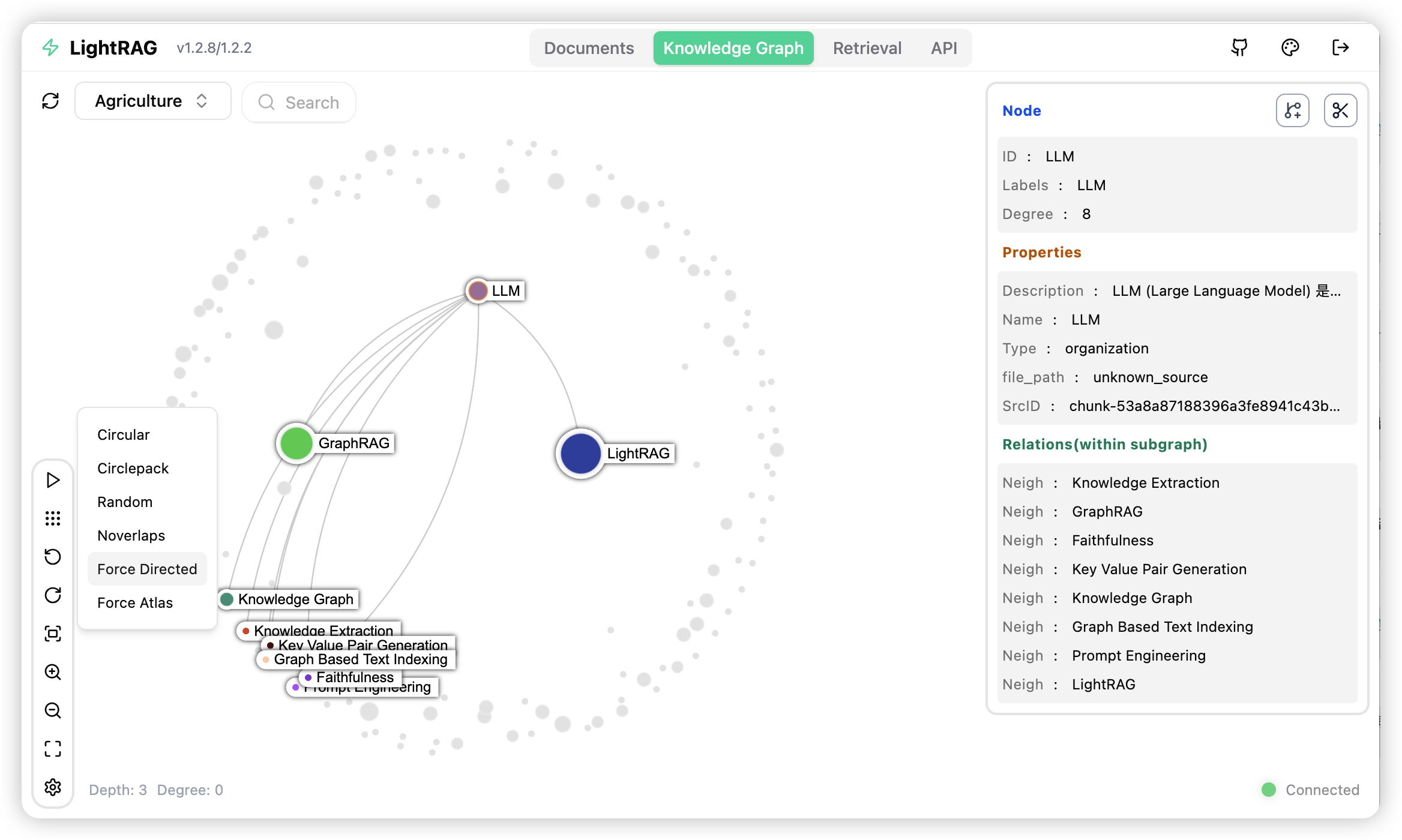
### Quick Start for LightRAG core
To get started with LightRAG core, refer to the sample codes available in the `examples` folder. Additionally, a [video demo](https://www.youtube.com/watch?v=g21royNJ4fw) demonstration is provided to guide you through the local setup process. If you already possess an OpenAI API key, you can run the demo right away:
```bash
### you should run the demo code with project folder
cd LightRAG
### provide your API-KEY for OpenAI
export OPENAI_API_KEY="sk-...your_opeai_key..."
### download the demo document of "A Christmas Carol" by Charles Dickens
curl https://raw.githubusercontent.com/gusye1234/nano-graphrag/main/tests/mock_data.txt > ./book.txt
### run the demo code
python examples/lightrag_openai_demo.py
```
For a streaming response implementation example, please see `examples/lightrag_openai_compatible_demo.py`. Prior to execution, ensure you modify the sample code's LLM and embedding configurations accordingly.
**Note 1**: When running the demo program, please be aware that different test scripts may use different embedding models. If you switch to a different embedding model, you must clear the data directory (`./dickens`); otherwise, the program may encounter errors. If you wish to retain the LLM cache, you can preserve the `kv_store_llm_response_cache.json` file while clearing the data directory.
**Note 2**: Only `lightrag_openai_demo.py` and `lightrag_openai_compatible_demo.py` are officially supported sample codes. Other sample files are community contributions that haven't undergone full testing and optimization.
## Programming with LightRAG Core
For the complete Core API reference — including init parameters, `QueryParam`, LLM/embedding provider examples (OpenAI, Ollama, Azure, Gemini, HuggingFace, LlamaIndex), reranker injection, insert operations, entity/relation management, and delete/merge — see **[docs/ProgramingWithCore.md](./docs/ProgramingWithCore.md)**.
> ⚠️ **If you would like to integrate LightRAG into your project, we recommend utilizing the REST API provided by the LightRAG Server**. LightRAG Core is typically intended for embedded applications or for researchers who wish to conduct studies and evaluations.
### Advanced Features
LightRAG provides additional capabilities including token usage tracking, knowledge graph data export, LLM cache management, Langfuse observability integration, and RAGAS-based evaluation. See **[docs/AdvancedFeatures.md](./docs/AdvancedFeatures.md)**.
### Multimodal Document Processing
LightRAG Server includes a multimodal document pipeline for PDFs, Office documents, images, tables, and formulas. Parsing is handled through external MinerU or Docling services, while multimodal indexing runs in the LightRAG pipeline. For setup details, see **[docs/AdvancedFeatures.md](./docs/AdvancedFeatures.md)**.
## Replicating Findings in the Paper
LightRAG consistently outperforms NaiveRAG, RQ-RAG, HyDE, and GraphRAG across agriculture, computer science, legal, and mixed domains. For the full evaluation methodology, prompts, and reproduce steps, see **[docs/Reproduce.md](./docs/Reproduce.md)**.
**Overall Performance Table**
||**Agriculture**||**CS**||**Legal**||**Mix**||
|----------------------|---------------|------------|------|------------|---------|------------|-------|------------|
||NaiveRAG|**LightRAG**|NaiveRAG|**LightRAG**|NaiveRAG|**LightRAG**|NaiveRAG|**LightRAG**|
|**Comprehensiveness**|32.4%|**67.6%**|38.4%|**61.6%**|16.4%|**83.6%**|38.8%|**61.2%**|
|**Diversity**|23.6%|**76.4%**|38.0%|**62.0%**|13.6%|**86.4%**|32.4%|**67.6%**|
|**Empowerment**|32.4%|**67.6%**|38.8%|**61.2%**|16.4%|**83.6%**|42.8%|**57.2%**|
|**Overall**|32.4%|**67.6%**|38.8%|**61.2%**|15.2%|**84.8%**|40.0%|**60.0%**|
||RQ-RAG|**LightRAG**|RQ-RAG|**LightRAG**|RQ-RAG|**LightRAG**|RQ-RAG|**LightRAG**|
|**Comprehensiveness**|31.6%|**68.4%**|38.8%|**61.2%**|15.2%|**84.8%**|39.2%|**60.8%**|
|**Diversity**|29.2%|**70.8%**|39.2%|**60.8%**|11.6%|**88.4%**|30.8%|**69.2%**|
|**Empowerment**|31.6%|**68.4%**|36.4%|**63.6%**|15.2%|**84.8%**|42.4%|**57.6%**|
|**Overall**|32.4%|**67.6%**|38.0%|**62.0%**|14.4%|**85.6%**|40.0%|**60.0%**|
||HyDE|**LightRAG**|HyDE|**LightRAG**|HyDE|**LightRAG**|HyDE|**LightRAG**|
|**Comprehensiveness**|26.0%|**74.0%**|41.6%|**58.4%**|26.8%|**73.2%**|40.4%|**59.6%**|
|**Diversity**|24.0%|**76.0%**|38.8%|**61.2%**|20.0%|**80.0%**|32.4%|**67.6%**|
|**Empowerment**|25.2%|**74.8%**|40.8%|**59.2%**|26.0%|**74.0%**|46.0%|**54.0%**|
|**Overall**|24.8%|**75.2%**|41.6%|**58.4%**|26.4%|**73.6%**|42.4%|**57.6%**|
||GraphRAG|**LightRAG**|GraphRAG|**LightRAG**|GraphRAG|**LightRAG**|GraphRAG|**LightRAG**|
|**Comprehensiveness**|45.6%|**54.4%**|48.4%|**51.6%**|48.4%|**51.6%**|**50.4%**|49.6%|
|**Diversity**|22.8%|**77.2%**|40.8%|**59.2%**|26.4%|**73.6%**|36.0%|**64.0%**|
|**Empowerment**|41.2%|**58.8%**|45.2%|**54.8%**|43.6%|**56.4%**|**50.8%**|49.2%|
|**Overall**|45.2%|**54.8%**|48.0%|**52.0%**|47.2%|**52.8%**|**50.4%**|49.6%|
## 🔗 Related Projects
*Ecosystem & Extensions*
---
## ⭐ Star History
[](https://star-history.com/#HKUDS/LightRAG&Date)
## 🤝 Contribution
We welcome contributions of all kinds — bug fixes, new features, documentation improvements, and more.
Please read our
Contributing Guide before submitting a pull request.
We thank all our contributors for their valuable contributions.
## 📖 Citation
```python
@article{guo2024lightrag,
title={LightRAG: Simple and Fast Retrieval-Augmented Generation},
author={Zirui Guo and Lianghao Xia and Yanhua Yu and Tu Ao and Chao Huang},
year={2024},
eprint={2410.05779},
archivePrefix={arXiv},
primaryClass={cs.IR}
}
```
---
⭐
Thank you for visiting LightRAG!
⭐